I apologize for the tardiness. Should have had this up last Monday. Never decided on an official update schedule, but I think Monday is a good day for it.
So, what have I been so busy that I couldn't post? Well, I've been trying to wrangle with Collision. If you've tested the last demo I put out, you might have noticed that things go through each other, including the player. That's because I haven't included any logic in the loop that looks for objects interacting. I essentially create the spheres and player ship, and draw them, but they're each doing their own thing.
Collision detection (and resolution) is about finding when these objects interact, and how. The clearest example is not letting objects go through each other. But it's also necessary for detecting bullets hitting targets and damaging them, and objects bouncing believably when they hit something.
This is a complex problem, but thankfully computers today are very powerful machines. Collisions on a scale unthinkable years ago can run on current hardware in real time. There's a great deal of studying that has gone into sorting this problem as well, both for research in scientific applications and in the video game industry looking for more realistic behaviors.
The first issue we find is how to determine that there was, indeed, a collision. There are many ways that this can be done, from checking every triangle in a model to every other triangle in the scene (where intersecting triangles identify a collision) to comparing bounding volumes, and ways of speeding up the process itself by culling impossible scenarios.
The way I chose to start with is essentially the simplest (and given my field of spheres, one that should work just fine). I create a bounding volume around each object. A bounding volume is a three dimensional shape built around an object that guarantees that no point in the object lies outside of the volume. Take a square, for example. A circle centered on the square and with a diameter at least as wide as either diagonal bounds the square, since all four points would lie inside it.
In my case, I'm using spheres as the bounding volume. I can center these on the entity, and size them so that they have the same size of the model (in the case of the spheres, for the ship the sphere is a bit bigger than it really needs to be). The idea behind the bounding volumes isn't to find if two objects intersect, but to be able to discard those that don't.
Comparing bounding volumes is faster and easier than comparing the models themselves, triangle to triangle. Since the volumes completely enclose the model, we know that if the two volumes don't meet there is no way for the models to meet, and we can discard the entire models at once instead of making sure triangle by triangle. Checking if two spheres intersect is a trivial check if you know their centers and their respective radii: If the distance between the centers is less than the sum of their radii, the spheres intersect. Else, they don't.
While we can guarantee that if the spheres don't intersect the models don't either (and we can then avoid checking further), it's not necessarily true that if they intersect the models are touching. Thus, it's possible (even expected) that the bounding volume method may yield "false positives", resulting in collisions when two objects aren't touching. The solution is to do a more expensive check, triangle against triangle for example, on these. The advantage is that by excluding the ones we know can't intersect with a cheap check, we save a considerable amount of computing power.
Other bounding volumes commonly used are AABBs and OBBs, which stand for Axis Aligned Bounding Box and Oriented Bounding Box. Both consist of building boxes around the models, with the difference that the OBB builds the smallest box that the model fits in and rotates it together with the model, while the AABB builds the smallest box that can align to the world coordinate system. If the object within an AABB changes orientation, the AABB must be recalculated.
The advantage the boxes have is that they produce fewer false positives than a sphere. Spheres leave too much empty volume, especially the less 'round' the object within it is. Consider a stick, for example. In such a case, where one dimension of the object is much larger than the other two, the sphere will be mostly empty and any objects passing through this empty space will need to be checked against the stick, resulting in wasted computation.
The second easiest volume to check is the AABB. To see if two volumes intersect, one must simply check the sides. It's simplified because they are aligned to the axis, so that the x,y or z values along each side are fixed. On the other hand, building the volume each time the model changes orientation can get expensive. In the case of the stick, for example, we find ourselves in pretty much the same situation as the sphere is it is oriented away from all three axis, and get the best results if lies along any one of them.
The OBB method, finally, guarantees the fewest false positives. Finding the smallest OBB can be a bit expensive, but it needs only be done once when you create the model. On the other hand, comparing OBBs to find intersections is more expensive than either of the previous methods.
There really isn't a 'best method', as they all have their own costs which need to be considered. AABBs are good for scenery, for example, which doesn't change orientation. On the other hand, if you have a roundish object, a sphere will produce less wasted space than either box method. The good thing is we don't need to 'choose' a single method, as for very little overhead we can implement box-sphere checks that let us mix things up.
Further, the bounding volume is only the first test. And as large and complex as models have become, it's not uncommon for there being a hierarchy of checks that are run, cutting the amount of triangle test required down to sane levels. With two ten thousand polygon models, for example, just checking one against the other would be too much wasted time.
Whew. That took more than I thought. Don't really have the time to fish for pictures though.
No new demo today, but soon. Next Monday: what happens when you find an intersection!
Monday, September 26, 2011


Monday, September 12, 2011
It's full of stars!
I've gotten a few new features into the framework, such as a first implementation on 'shooting', but that's not what I want to talk about today.
So far, I've focused solely on functional details. Making models, making sure the models are displayed, movement, views and such. The result is... well, it's functional. Of course I want to have something good before I start polishing. A polished turd is still a turd, so I have to turn it into something else first.
The traditional way of making a background is making use of a skybox. This is basically a cube you draw around the scene. With the aid of something called cubemapping, you can slap the sky on the inside and the textures used fool the eye into thinking it's looking at a dome, rather than a cube. No seams or anything, if done correctly.
Of course, I didn't have the textures to make it look good handy.while there are plenty of images of space around, there's very few of a look at the complete sky, and those that are have fish eye effects. I could have slapped a few images, merged them together or something and called it a day, but I wanted something special.
So, I started a little side project. The idea being, I'd create the background out of a real galaxy I made up on the spot. This would mean create all the stars, jump into an appropriate position inside the galaxy and take pictures of what is visible in each direction. That way I would have the textures I needed for the cube map. I could scale the definition as much as I want, or move to a different spot and have the constelations in the background actually shift properly.
How to do it, though? A galaxy like our milky way has on the order of a hundred billion stars. Can't really draw them one at a time. Instead, my plan is to split the space the galaxy occupies into as many blocks as I can manage, and give it shape with the use of two functions.
One of the functions will give the galaxy a shape. The second will add some higher frequency noise to make it look more interesting.
I will represent the blocks with points, and once I have it all working try to improve the appearance. I really want the GPU to do the heavy lifting here. I can make a shader program that checks the position of each point and assigns it a value for each function, then multiplies them together. But if I tell the GPU to draw a million points one at a time, the overhead on the calls will slow things to a crawl. So what I do instead is make use of instanced drawing.
Instanced drawing means I tell the gpu to draw a singlemodel (in my case, as ingle point) as many times as I want. It's helpful for drawing many identical objects. The result, after setting the color to solid red, is not very impressive:
Of course, drawing several identical points means they get drawn in the same spot. In order to add variation, the gpu gives me an extra variable, an instance id, which I can manipulate for some interesting effects.
For my first test, I'm sending 0x1000 points to the gpu. That's 4096 in decimal, but you'll see why I work in hex in a bit. This means the instance ids range from 0x0 to 0xFFF (4095). What I can do is treat each of the hex digits as a coordinate in one of the axis, x, y and z, and move the point by that amount. So for example, the point 0x123 maps to position (1, 2, 3). I use bit masks and some bitwise arithmetic to work out the positions, which is why I do it this way. Computers, as you know, like binary and powers of 2 better than decimal.
Adding the instance id into the mix then, the result is a cube made of red dots. Not very impressinve right now, but it's a start.
I can play around with color too. For example, if I treat x as Red, y as Green and z as Blue, I get a colorful cube:

Ok, so back to the galaxy. First, I'll give it a proper shape. A cube is hardly the proper shape, so let's ignore points outside of a central sphere. For that, I'll give points further than 1 unit from the center a color of 0.1. There may be a few stragglers around the galaxy, but they're few and far between.

Much better. Now, galaxies tend to be shaped as disks, more than spheres, so we want to squash the sphere as well. What we want is to decrease the intensity with regards to the height from the plane. I'll use y to measure height from the plane, and to avoid the break being so obvious I'll also diminish the intensity along the diskthe farther you are from the center. The result:

Not so bad. Still need to add more features, though. For example, our galaxy has spiral arms. These will require a bit more thinking.
I didn't get quite as far as I meant to, mostly due to Deus Ex. Still, I don't want to leave you without an update so check out Framework-0.0.6r. You can do everything you could do before, and now shoot too! The space key now fires instead of accelerating, you accelerate with Left Shift. Fun* game to play: see how much you can shoot before it starts slowing down the game. TODO: delete the bullets when they're no longer relevant.
I've also made the folder with all the releases public, so anyone can look up the history without digging through the archives. Framework releases.
* It's fun for me, but then I had fun with the first release too.
So far, I've focused solely on functional details. Making models, making sure the models are displayed, movement, views and such. The result is... well, it's functional. Of course I want to have something good before I start polishing. A polished turd is still a turd, so I have to turn it into something else first.
The traditional way of making a background is making use of a skybox. This is basically a cube you draw around the scene. With the aid of something called cubemapping, you can slap the sky on the inside and the textures used fool the eye into thinking it's looking at a dome, rather than a cube. No seams or anything, if done correctly.
Of course, I didn't have the textures to make it look good handy.while there are plenty of images of space around, there's very few of a look at the complete sky, and those that are have fish eye effects. I could have slapped a few images, merged them together or something and called it a day, but I wanted something special.
So, I started a little side project. The idea being, I'd create the background out of a real galaxy I made up on the spot. This would mean create all the stars, jump into an appropriate position inside the galaxy and take pictures of what is visible in each direction. That way I would have the textures I needed for the cube map. I could scale the definition as much as I want, or move to a different spot and have the constelations in the background actually shift properly.
How to do it, though? A galaxy like our milky way has on the order of a hundred billion stars. Can't really draw them one at a time. Instead, my plan is to split the space the galaxy occupies into as many blocks as I can manage, and give it shape with the use of two functions.
One of the functions will give the galaxy a shape. The second will add some higher frequency noise to make it look more interesting.
I will represent the blocks with points, and once I have it all working try to improve the appearance. I really want the GPU to do the heavy lifting here. I can make a shader program that checks the position of each point and assigns it a value for each function, then multiplies them together. But if I tell the GPU to draw a million points one at a time, the overhead on the calls will slow things to a crawl. So what I do instead is make use of instanced drawing.
Instanced drawing means I tell the gpu to draw a singlemodel (in my case, as ingle point) as many times as I want. It's helpful for drawing many identical objects. The result, after setting the color to solid red, is not very impressive:
 |
| 4096 points, all drawn on top of each other. |
For my first test, I'm sending 0x1000 points to the gpu. That's 4096 in decimal, but you'll see why I work in hex in a bit. This means the instance ids range from 0x0 to 0xFFF (4095). What I can do is treat each of the hex digits as a coordinate in one of the axis, x, y and z, and move the point by that amount. So for example, the point 0x123 maps to position (1, 2, 3). I use bit masks and some bitwise arithmetic to work out the positions, which is why I do it this way. Computers, as you know, like binary and powers of 2 better than decimal.
Adding the instance id into the mix then, the result is a cube made of red dots. Not very impressinve right now, but it's a start.
 |
| I'm moving the points a bit, as well, so they appear centered. |

Ok, so back to the galaxy. First, I'll give it a proper shape. A cube is hardly the proper shape, so let's ignore points outside of a central sphere. For that, I'll give points further than 1 unit from the center a color of 0.1. There may be a few stragglers around the galaxy, but they're few and far between.

Much better. Now, galaxies tend to be shaped as disks, more than spheres, so we want to squash the sphere as well. What we want is to decrease the intensity with regards to the height from the plane. I'll use y to measure height from the plane, and to avoid the break being so obvious I'll also diminish the intensity along the diskthe farther you are from the center. The result:

Not so bad. Still need to add more features, though. For example, our galaxy has spiral arms. These will require a bit more thinking.
I didn't get quite as far as I meant to, mostly due to Deus Ex. Still, I don't want to leave you without an update so check out Framework-0.0.6r. You can do everything you could do before, and now shoot too! The space key now fires instead of accelerating, you accelerate with Left Shift. Fun* game to play: see how much you can shoot before it starts slowing down the game. TODO: delete the bullets when they're no longer relevant.
I've also made the folder with all the releases public, so anyone can look up the history without digging through the archives. Framework releases.
* It's fun for me, but then I had fun with the first release too.
Sunday, September 4, 2011
In the driver's seat
So I have a basic implementation of newtonian movement worked out. But we're still controlling an object that eventually flies off into the distance. And once it's out of view, it's pretty unlikely that it will come back. Wouldn't it be nice, though, if we could keep track of it?
Yes, yes it would. So having worked out movement, I focused on the camera. I decided to start with two views. One from the cockpit, which tracks the rotation of the object, and the other the familiar chase camera, looking at the object from behind, and tracking the direction of movement.
The reason I made these decisions is that movement in three dimensions is pretty unintuitive, specially when you remove friction. Most space flight games get around this unintuitiveness by treating space as a giant pool. You can remain buoyant at any spot, but there's a constant friction that slows you down as soon as you stop your engines. This allows people to point themselves in the direction they want to go and fire the engines. Any transversal motion will eventually be slowed enough that they end up reaching their destination with a minimum of effort.
With newtonian physics, however, there's no meaning to the idea of slowing down. Slowing down with respect to what? Speed is wholly relative. Firing your engines in the direction you want to go leads you to shoot around your target. It is madness. I needed a way to recover some of the intuitiveness, without sacrificing the fun of being in space.
The chase cam was my solution. Other games implement a chase view, but they waste it by keeping it aligned with the ship, so you're always watching your ship from behind. This is useful for shooting things, since weapons tend to be aligned with the front of the ship, but not so much for navigation. It's essentially the same as the cockpit view, only from outside the ship.
With my implementation, the player will see the direction they're actually moving in. If they want to head towards something, they have to align their objective with the center of this view. In the meantime, the ship is free to rotate any which way, and accelerating in different directions will shift the view. Ironically, racing games make a better use of the chase view than space flight games. For the most part you sit squarely behind the car, but you can notice when turning hard around corners or drifting that your car will turn while you keep looking in the direction that your car is still going in.
Still, shooting things is important. I can see how it would be quite distressing not to be able to see what you're shooting at, which is what the cockpit view is for. Eventually, helpful GUI elements will minimize the difficulty of getting from A to B when you don't have friction helping you along, but for a start the chase view should help.
Of course, before applying these views I had to populate the space somehow. A view from the cockpit in empty space would look completely static regardless of your movement. I decided to do two things. First, I draw a cube around the ship, which remains in a fixed orientation at all times. This let's you see how your orientation changes, but since you don't move around the cube but sit always in the middle, you can't see your translation. This is how skyboxes work, but since I don't have textures working yet green lines will have to do.
The second is, I actually start using all the infrastructure I'd been talking about before. During initialization I'm make a few different models (a sphere for 'asteroids', a piramid for the player), and store them in the cache. Then I create an entity for the player, and assign it the piramid model.
For the asteroids I do a little trick to get more variation. Based on the sphere model, I create new models which point to the same vertex buffers (where the sphere shape is stored in the video card), but add a scaling matrix to alter the size.
I make about fifty asteroids with random sizes and assign them random positions about the starting location for the player. Then during rendering I go through the list of entities, apply the scaling transformation and draw the result. Happily it works with very little additional fussing.
For the demo I only have the cockpit view working, which was pretty easy to implement by giving the camera the same reference frame as the player. It is available for download as usual: Framework-0.0.5r
Since it doesn't work on all machines just yet, I also created a short video of the demo.
So what's next? I should have the chase view working, and the possibility to switch between the two views. If I have the time I'll even throw in something special.
Yes, yes it would. So having worked out movement, I focused on the camera. I decided to start with two views. One from the cockpit, which tracks the rotation of the object, and the other the familiar chase camera, looking at the object from behind, and tracking the direction of movement.
The reason I made these decisions is that movement in three dimensions is pretty unintuitive, specially when you remove friction. Most space flight games get around this unintuitiveness by treating space as a giant pool. You can remain buoyant at any spot, but there's a constant friction that slows you down as soon as you stop your engines. This allows people to point themselves in the direction they want to go and fire the engines. Any transversal motion will eventually be slowed enough that they end up reaching their destination with a minimum of effort.
With newtonian physics, however, there's no meaning to the idea of slowing down. Slowing down with respect to what? Speed is wholly relative. Firing your engines in the direction you want to go leads you to shoot around your target. It is madness. I needed a way to recover some of the intuitiveness, without sacrificing the fun of being in space.
 |
| Surprisingly, still images do a poor job of demonstrating motion. |
With my implementation, the player will see the direction they're actually moving in. If they want to head towards something, they have to align their objective with the center of this view. In the meantime, the ship is free to rotate any which way, and accelerating in different directions will shift the view. Ironically, racing games make a better use of the chase view than space flight games. For the most part you sit squarely behind the car, but you can notice when turning hard around corners or drifting that your car will turn while you keep looking in the direction that your car is still going in.
Still, shooting things is important. I can see how it would be quite distressing not to be able to see what you're shooting at, which is what the cockpit view is for. Eventually, helpful GUI elements will minimize the difficulty of getting from A to B when you don't have friction helping you along, but for a start the chase view should help.
Of course, before applying these views I had to populate the space somehow. A view from the cockpit in empty space would look completely static regardless of your movement. I decided to do two things. First, I draw a cube around the ship, which remains in a fixed orientation at all times. This let's you see how your orientation changes, but since you don't move around the cube but sit always in the middle, you can't see your translation. This is how skyboxes work, but since I don't have textures working yet green lines will have to do.
 |
| So that's what those lines are for. |
For the asteroids I do a little trick to get more variation. Based on the sphere model, I create new models which point to the same vertex buffers (where the sphere shape is stored in the video card), but add a scaling matrix to alter the size.
I make about fifty asteroids with random sizes and assign them random positions about the starting location for the player. Then during rendering I go through the list of entities, apply the scaling transformation and draw the result. Happily it works with very little additional fussing.
For the demo I only have the cockpit view working, which was pretty easy to implement by giving the camera the same reference frame as the player. It is available for download as usual: Framework-0.0.5r
Since it doesn't work on all machines just yet, I also created a short video of the demo.
Saturday, September 3, 2011
Angular Momentum
A couple of posts back, when dealing with rotation, I wondered how I could model the property of angular momentum. Inertial momentum is easy enough to represent with a speed vector which you add to the entity's position every frame. Velocity shares several characteristics with rotation, surprisingly. In physics angular velocity is also represented with a vector, with the direction determining the axis of rotation and the length the angular speed. I figured this was, after all, everything I needed. It would make sense then to try to use it.
It wasn't too much work to add a vector to the entity object, and modify the code so that pressing the rotation keys would add to this vector. The rather clever bit, I think, is that I store the vector in world coordinates. By keeping track of the frame of reference for my objects I can easily convert between local and world coordinates. This is important because I add rotation along the three local axis, but convert the addition to global coordinates before adding them to my rotation vector.
Then in the update logic I rotate along the vector's axis by an amount determined by its length. One thing to keep in mind though is that to make the rotation look realistic, I have to center models on their center of mass. Easy enough on regular geometric shapes, but I'll have to figure out something for complex models, or models with moving parts.
The demo for this is available for download: Framework-0.0.4r
It's fun to mess around with. There's a weird effect that happens when you spin up significantly, and the refresh rate starts to match up with the turning speed and the sphere appears to slow down or rotate backwards.
You can also hopelessly lose control of the thing if you mix too much spin in different directions. It should be possible to recover from the perspective of someone inside, since you can easily break down the spin one axis at a time. That's something for the next update, though.
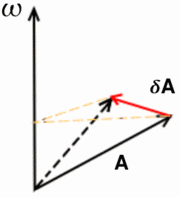 |
| The farther away from the axis of rotation, the greater the change in position. |
Then in the update logic I rotate along the vector's axis by an amount determined by its length. One thing to keep in mind though is that to make the rotation look realistic, I have to center models on their center of mass. Easy enough on regular geometric shapes, but I'll have to figure out something for complex models, or models with moving parts.
The demo for this is available for download: Framework-0.0.4r
It's fun to mess around with. There's a weird effect that happens when you spin up significantly, and the refresh rate starts to match up with the turning speed and the sphere appears to slow down or rotate backwards.
You can also hopelessly lose control of the thing if you mix too much spin in different directions. It should be possible to recover from the perspective of someone inside, since you can easily break down the spin one axis at a time. That's something for the next update, though.
Thursday, September 1, 2011
Modeling a sphere, the new way
Back when I began this blog, almost a year ago, I set a goal for myself of drawing a sphere. Back then I didn't know about the fixed pipeline, and how it had been replaced by shaders and a more flexible approach. I was pretty much learning as I went, and I was just starting out.
Now on my 50th post, I have a bit more experience under my belt, and it's interesting to see how far I've come and how I've changed the approach for doing exactly the same. It hasn't been easy or smooth, I've had to start over three or four times, but through it all I've progressed.
Last year my approach had used the fixed pipeline, and I was sending triangle strips to be rendered, one slice of the sphere at a time. This time, what I've done is create a set of vertices, and build the triangles by connecting the dots. By creating a vertex buffer array, the information is stored in the video memory meaning I don't have to send a load of data to the graphics card each frame.
Fair warning, there's a bit of geometry ahead. I'll try to be clear.
I want to find the positions of the points at the intersections, which are the ones I'll use as vertices for my triangles. My approach is to loop through the grid, finding the spherical coordinates (radius, angle theta from the horizontal plane and angle phi around the axis) for each point and translating them to Cartesian coordinates (x, y, z).
To make matters easier I'll create a sphere with radius 1. If I want to use a larger sphere later, I can just scale the model accordingly. I'm also going to be working out the normals for each point. Since this is a sphere with radius 1, though, the normals will be the same as the coordinates.
Working out the spherical coordinates of the points is simple enough. Theta can vary between 0 and pi, and phi can vary between 0 and 2*pi. For a sphere of a given resolution, determined by the number of cuts and slices I use, I can determine the variation between grid points along each coordinate. With three cuts for example, the theta values would be 0 (for the north pole), pi/4 (45°), pi/2(90°, ecuator), 3pi/4 (135°) and pi (for the south pole).
Then it's just a matter of looping through all the possible values for each spherical coordinate, and translating to Cartesian, which is a simple trigonometry operation.
I now have a list with all the points in the sphere. The next thing I need to do is to create a list of indices, telling me which points make each triangle. If I had the four points
I could use the two triangles define by the points 1,2,4 and 2,3,4 to build a square, for example. With the sphere it's the same. Knowing how I traverse the sphere in the first place, I can determine which points build the triangles on the surface. It's important though to consider that the polar caps of the model behave differently than the main body, but that special case is simple enough to handle.
After I've stored all this information in arrays, I need to feed it to the video card. I build a vertex buffer array, which stores information about what buffer objects to use, and several vertex buffer objects to actually store the information. For each point I'm storing it's position, normal, color, and texture coordinates. Add the index array for telling the card how to group them into triangles, and I need to use five buffers. On the plus side, that's a whole lot of information I no longer need to worry about. When I next wish to draw the sphere, I simply bind the vertex buffer array and draw it.
The result is visible in the demo for Framewrok-0.0.3r, where I changed the old single triangle model for a fairly detailed sphere.
Now on my 50th post, I have a bit more experience under my belt, and it's interesting to see how far I've come and how I've changed the approach for doing exactly the same. It hasn't been easy or smooth, I've had to start over three or four times, but through it all I've progressed.
Last year my approach had used the fixed pipeline, and I was sending triangle strips to be rendered, one slice of the sphere at a time. This time, what I've done is create a set of vertices, and build the triangles by connecting the dots. By creating a vertex buffer array, the information is stored in the video memory meaning I don't have to send a load of data to the graphics card each frame.
Same as before, I'm cutting the sphere like a globe, with parallels running east to west and meridians running north to south.
 |
| In spherical coordinates, parallels correspond to theta values and meridians to phi values. |
I want to find the positions of the points at the intersections, which are the ones I'll use as vertices for my triangles. My approach is to loop through the grid, finding the spherical coordinates (radius, angle theta from the horizontal plane and angle phi around the axis) for each point and translating them to Cartesian coordinates (x, y, z).
To make matters easier I'll create a sphere with radius 1. If I want to use a larger sphere later, I can just scale the model accordingly. I'm also going to be working out the normals for each point. Since this is a sphere with radius 1, though, the normals will be the same as the coordinates.
Working out the spherical coordinates of the points is simple enough. Theta can vary between 0 and pi, and phi can vary between 0 and 2*pi. For a sphere of a given resolution, determined by the number of cuts and slices I use, I can determine the variation between grid points along each coordinate. With three cuts for example, the theta values would be 0 (for the north pole), pi/4 (45°), pi/2(90°, ecuator), 3pi/4 (135°) and pi (for the south pole).
Then it's just a matter of looping through all the possible values for each spherical coordinate, and translating to Cartesian, which is a simple trigonometry operation.
I now have a list with all the points in the sphere. The next thing I need to do is to create a list of indices, telling me which points make each triangle. If I had the four points
1 ( 0, 1, 0)
2 (-1, 0, 0)
3 ( 0,-1, 0)
4 ( 1, 0, 0)
I could use the two triangles define by the points 1,2,4 and 2,3,4 to build a square, for example. With the sphere it's the same. Knowing how I traverse the sphere in the first place, I can determine which points build the triangles on the surface. It's important though to consider that the polar caps of the model behave differently than the main body, but that special case is simple enough to handle.
After I've stored all this information in arrays, I need to feed it to the video card. I build a vertex buffer array, which stores information about what buffer objects to use, and several vertex buffer objects to actually store the information. For each point I'm storing it's position, normal, color, and texture coordinates. Add the index array for telling the card how to group them into triangles, and I need to use five buffers. On the plus side, that's a whole lot of information I no longer need to worry about. When I next wish to draw the sphere, I simply bind the vertex buffer array and draw it.
The result is visible in the demo for Framewrok-0.0.3r, where I changed the old single triangle model for a fairly detailed sphere.
Wednesday, August 31, 2011
Rotation
With translation out of the way, I moved on to something more complicated. Rotation.
The last time I went about it, I tried it with quaternions. It was time consuming and I'm not entirely sure how it even ended up working. Euler angles are even worse. Vectors and matrices, however, seem more suited to solve the problem and play nice with OpenGL. And since the GLTools library I'm using already handles that, I really only need to wrap a few calls in my entities to get it working.
As I mentioned in my previous post, I have a reference frame determined by three vectors and a position. This makes local rotations simple. If I want to roll along the length of the model, I rotate around the forward vector. If I want to change the pitch of the model, I rotate around the right vector. And if I want to turn to either side, I rotate around the up vector.
I do the same basic set up as I did for translation, except my keys now affect rotation. I tie each pair of keys to a fixed rotation around each of my local axis, so that as long as I hold a key the model rotates and on release it stops rotating.
This gets the model turning about, and to spice things up I decide to give it the ability to accelerate. I first create a velocity vector, initially set to 0 so the body is at rest. Then, when I accelerate, I add to the vector a speed increment in the forward direction. When it comes time to update my entity's position, I add the velocity vector to it's position and done. This models newtonian movement well enough; velocity is constant unless I accelerate in a given direction. If I want to stop, I have to accelerate in the opposite direction to my movement.
I can rotate around independently of my direction of movement because I store the velocity vector in global coordinates. I could easily work out the vector in local coordinates as well, and it would provide a vector that moves around as I rotate the ship.
The result is Framework-0.0.2r.
What is missing, however, is that rotation should also be continuous unless I stop it. I'm modeling conservation of momentum, but not of angular momentum. I would need to store another vector, much like the velocity vector, which is affected by what kind of rotation I attempt. Unfortunately I'm not 100% sure on the physics involved here. Ideally I could just add vectors, same as with speed. The angle of rotation would be determined by the magnitude of the vector, while the axis of rotation would be the direction of the vector. That feels about right, and I should have it set up for Framework-0.0.4r.
Next up, I reworked my sphere building algorithms from the very beginnings of this blog. I used to use triangle strips, but together with the fixed pipeline that's obsolete. Vertex lists and indices is where it's at now.
The last time I went about it, I tried it with quaternions. It was time consuming and I'm not entirely sure how it even ended up working. Euler angles are even worse. Vectors and matrices, however, seem more suited to solve the problem and play nice with OpenGL. And since the GLTools library I'm using already handles that, I really only need to wrap a few calls in my entities to get it working.
As I mentioned in my previous post, I have a reference frame determined by three vectors and a position. This makes local rotations simple. If I want to roll along the length of the model, I rotate around the forward vector. If I want to change the pitch of the model, I rotate around the right vector. And if I want to turn to either side, I rotate around the up vector.
I do the same basic set up as I did for translation, except my keys now affect rotation. I tie each pair of keys to a fixed rotation around each of my local axis, so that as long as I hold a key the model rotates and on release it stops rotating.
This gets the model turning about, and to spice things up I decide to give it the ability to accelerate. I first create a velocity vector, initially set to 0 so the body is at rest. Then, when I accelerate, I add to the vector a speed increment in the forward direction. When it comes time to update my entity's position, I add the velocity vector to it's position and done. This models newtonian movement well enough; velocity is constant unless I accelerate in a given direction. If I want to stop, I have to accelerate in the opposite direction to my movement.
I can rotate around independently of my direction of movement because I store the velocity vector in global coordinates. I could easily work out the vector in local coordinates as well, and it would provide a vector that moves around as I rotate the ship.
The result is Framework-0.0.2r.
What is missing, however, is that rotation should also be continuous unless I stop it. I'm modeling conservation of momentum, but not of angular momentum. I would need to store another vector, much like the velocity vector, which is affected by what kind of rotation I attempt. Unfortunately I'm not 100% sure on the physics involved here. Ideally I could just add vectors, same as with speed. The angle of rotation would be determined by the magnitude of the vector, while the axis of rotation would be the direction of the vector. That feels about right, and I should have it set up for Framework-0.0.4r.
Next up, I reworked my sphere building algorithms from the very beginnings of this blog. I used to use triangle strips, but together with the fixed pipeline that's obsolete. Vertex lists and indices is where it's at now.
Progress!
Lots to talk about. I haven't been posting here as often as I'd like, but I have managed to get quite a bit of work done.
Let's see, last time, I had a triangle on the screen. And I wanted to make it interactive. The first thing I did was create a few methods in my entity object that would modify the entity's frame of reference.The frame of reference describes the position and orientation of something in space, and helps translate between local and global coordinates.
Local coordinates are coordinates from the object's point of view, while global coordinates are the coordinate system of the world the object is in. For ease of reading, I'll denote local coordinates as (x,y,z)l, and global coordinates as (x,y,z)g.
From the object's perspective (meaning in local coordinates), all points are static. It's center is always at (0,0,0)l, and the axis are always (1,0,0)l,(0,1,0)l and (0,0,1)l. A point at (1,1,1)l is always at (1,1,1)l.
The same point in global coordinates, however, depends on the position and orientation of the object in the world. When the object sits still at the global origin, both coordinate systems match up. If the object moves 1 unit forward, so the local origin now sits at (1,0,0)g, then the point that is (1,1,1)l is actually (2,1,1)g.
We can define a frame of reference as an origin (the position in global coordinates), a forward vector (in global coordinates) and an up vector (in global coordinates). From the cross product of these two vectors I can get the right vector, and these three determine the orientation of the local coordinate axis.
That's the difficult part out of the way, then.
I started with translation, which was easy enough. In order to advance 'forwards', I need to advance along the object's forward vector. To do this, I simply add the forward vector times a speed factor to the object's origin, and tie this to a key input. I can do the same with the up and right vectors, and the result is that the object will move around the screen when you press a key.
Quite surprisingly, I did it, and it worked! I was on a roll, so I even modified the shader so it would accept the color of a given point and shade the resulting triangle with the value of each point.
I'll put up a few screenshots later. I'm also thinking I'll put the demo here just in case. If I can work out how to do it.
And I did, thanks to google. Now you too can get Framework 0.0.1r! You only need 7zip to uncompress it, and it comes ready to run.
Let's see, last time, I had a triangle on the screen. And I wanted to make it interactive. The first thing I did was create a few methods in my entity object that would modify the entity's frame of reference.The frame of reference describes the position and orientation of something in space, and helps translate between local and global coordinates.
Local coordinates are coordinates from the object's point of view, while global coordinates are the coordinate system of the world the object is in. For ease of reading, I'll denote local coordinates as (x,y,z)l, and global coordinates as (x,y,z)g.
From the object's perspective (meaning in local coordinates), all points are static. It's center is always at (0,0,0)l, and the axis are always (1,0,0)l,(0,1,0)l and (0,0,1)l. A point at (1,1,1)l is always at (1,1,1)l.
The same point in global coordinates, however, depends on the position and orientation of the object in the world. When the object sits still at the global origin, both coordinate systems match up. If the object moves 1 unit forward, so the local origin now sits at (1,0,0)g, then the point that is (1,1,1)l is actually (2,1,1)g.
We can define a frame of reference as an origin (the position in global coordinates), a forward vector (in global coordinates) and an up vector (in global coordinates). From the cross product of these two vectors I can get the right vector, and these three determine the orientation of the local coordinate axis.
That's the difficult part out of the way, then.
I started with translation, which was easy enough. In order to advance 'forwards', I need to advance along the object's forward vector. To do this, I simply add the forward vector times a speed factor to the object's origin, and tie this to a key input. I can do the same with the up and right vectors, and the result is that the object will move around the screen when you press a key.
Quite surprisingly, I did it, and it worked! I was on a roll, so I even modified the shader so it would accept the color of a given point and shade the resulting triangle with the value of each point.
I'll put up a few screenshots later. I'm also thinking I'll put the demo here just in case. If I can work out how to do it.
And I did, thanks to google. Now you too can get Framework 0.0.1r! You only need 7zip to uncompress it, and it comes ready to run.
Monday, August 8, 2011
Back to square one again!
Well, I spent a lot of time scratching my head over a problem that turned out to be a simple dumb issue.
As I detailed in my last post, my models consists of pointers to video memory where the actual information is stored. In a fit of genius, I realized that if I deleted the model but forgot to clean up the information, I'd be leaking video memory. That would be bad. So I made sure that, before a model is destroyed, the information is cleaned up.
This seemed like a clever solution, and the subtle problem didn't become obvious to me until I spent two weeks wondering what I was doing wrong.
The problem happened with copying the model. I created the model in one part of the program, and copied it to the cache that would store it. This preserved the pointers, but when the original model was cleaned up it cleaned up the video memory. Just as I told it to. The copy was then left with pointers that were no longer valid. So when I then asked the program to render the model, it couldn't.
Thankfully the problem wasn't hard to solve. I instead created the model in a space in memory where I have more control of when it gets destroyed, and copy instead a pointer to it. This way the model object itself is never copied or destroyed and I can store it directly. In the process I learned a bit, so I call it a success.
I also had to add a shader to the program, which I should have probably worked into the framework before I did the work on the models. Thankfully I had a ready made function that handles all the aspects of reading the shader from file, loading it to video memory, compiling, linking and binding attributes.
So now, after a couple of months, I'm able to render a red triangle to the screen. Which is about what I was at before the rewrite. So, yay?
Well, to be honest I have a lot more than before. I can read input, and configure it (just need to add more input to be read). My storage is a lot more organized and extensible. I need to do some adjustments to my design to account for lessons learned, but I'm very happy with what I have.
Next up, I'll be adding some actual interactivity. Well, first deal with matrices, then interactivity.
As I detailed in my last post, my models consists of pointers to video memory where the actual information is stored. In a fit of genius, I realized that if I deleted the model but forgot to clean up the information, I'd be leaking video memory. That would be bad. So I made sure that, before a model is destroyed, the information is cleaned up.
This seemed like a clever solution, and the subtle problem didn't become obvious to me until I spent two weeks wondering what I was doing wrong.
The problem happened with copying the model. I created the model in one part of the program, and copied it to the cache that would store it. This preserved the pointers, but when the original model was cleaned up it cleaned up the video memory. Just as I told it to. The copy was then left with pointers that were no longer valid. So when I then asked the program to render the model, it couldn't.
Thankfully the problem wasn't hard to solve. I instead created the model in a space in memory where I have more control of when it gets destroyed, and copy instead a pointer to it. This way the model object itself is never copied or destroyed and I can store it directly. In the process I learned a bit, so I call it a success.
I also had to add a shader to the program, which I should have probably worked into the framework before I did the work on the models. Thankfully I had a ready made function that handles all the aspects of reading the shader from file, loading it to video memory, compiling, linking and binding attributes.
So now, after a couple of months, I'm able to render a red triangle to the screen. Which is about what I was at before the rewrite. So, yay?
Well, to be honest I have a lot more than before. I can read input, and configure it (just need to add more input to be read). My storage is a lot more organized and extensible. I need to do some adjustments to my design to account for lessons learned, but I'm very happy with what I have.
Next up, I'll be adding some actual interactivity. Well, first deal with matrices, then interactivity.
Tuesday, July 12, 2011
Top Models
With everything I've done, it's about time I start getting to drawing something to the screen. Before I can do that, however, I have to define what it is I'm going to draw. The shapes that describe the different objects in the world are called models.
Models in three dimensions are composed of triangles, and these are made up of three vertices each. A vertex (singular of vertices) is described by several numbers. We need it's position in space, which is described by three coordinates (x,y,z). We also need the normal for each point, which is used in lighting calculations and describes a direction perpendicular to the surface. This vector is also described by three values and should be of unit length. We can specify a color for each point, which requires the color values (RGB, greyscale, transparency, etc). Finally we have the texture coordinates, which describe the point on a texture that should be mapped to the vertex. Since textures are flat, this is accomplished with just two values, (u,v).
This means there are between nine and twelve values that describe a point. These values can be stored on the video card itself, using structures called Vertex Buffer Objects. Each of these objects can be called with a unique ID called names, which OpenGL provides when you request the creation of one.
This means that my model structure in the program needs to know only the VBO name.
When storing the vertex positions, however, I am doing it in the model coordinates. Depending on how I translate them to screen coordinates, I could scale or stretch the model. If I want to draw a large sphere and a small sphere, I could either store the points for each, or I could store the points for a unit sphere and scale it to the size I want.
Additionally, I could have a model consisting of different sub-models. For example, one could create a snowman out of reusing the model for a sphere, instead of a single model storing the values of two spheres. In order to do this, the snowman model would need the name of the basic sphere and two matrices, to scale and translate the spheres to the correct shape and position.
This implies two kinds of models. The primitives would consist of the Vertex Buffer Object names, while the complex ones would consist of a list of primitives and matrices applied to them. Of course, the list could also contain other complex models itself. These two types could be condensed if we stored both properties in every model. Primitive types would hold empty lists, while the VBO names for complex types would be null.
The models would then be stored in the model cache, and different entities would call them when needed.
I would still need methods for loading the vertex information into the buffers, however, and for drawing them. But this is something to look into in another post.
Models in three dimensions are composed of triangles, and these are made up of three vertices each. A vertex (singular of vertices) is described by several numbers. We need it's position in space, which is described by three coordinates (x,y,z). We also need the normal for each point, which is used in lighting calculations and describes a direction perpendicular to the surface. This vector is also described by three values and should be of unit length. We can specify a color for each point, which requires the color values (RGB, greyscale, transparency, etc). Finally we have the texture coordinates, which describe the point on a texture that should be mapped to the vertex. Since textures are flat, this is accomplished with just two values, (u,v).
This means there are between nine and twelve values that describe a point. These values can be stored on the video card itself, using structures called Vertex Buffer Objects. Each of these objects can be called with a unique ID called names, which OpenGL provides when you request the creation of one.
This means that my model structure in the program needs to know only the VBO name.
When storing the vertex positions, however, I am doing it in the model coordinates. Depending on how I translate them to screen coordinates, I could scale or stretch the model. If I want to draw a large sphere and a small sphere, I could either store the points for each, or I could store the points for a unit sphere and scale it to the size I want.
Additionally, I could have a model consisting of different sub-models. For example, one could create a snowman out of reusing the model for a sphere, instead of a single model storing the values of two spheres. In order to do this, the snowman model would need the name of the basic sphere and two matrices, to scale and translate the spheres to the correct shape and position.
This implies two kinds of models. The primitives would consist of the Vertex Buffer Object names, while the complex ones would consist of a list of primitives and matrices applied to them. Of course, the list could also contain other complex models itself. These two types could be condensed if we stored both properties in every model. Primitive types would hold empty lists, while the VBO names for complex types would be null.
The models would then be stored in the model cache, and different entities would call them when needed.
I would still need methods for loading the vertex information into the buffers, however, and for drawing them. But this is something to look into in another post.
Saturday, July 9, 2011
Event handling done, and a bit about File I/O
Well, the bare-bones version of the event handling system is done. There are some improvements to make, and I only support a few keys and commands still, but the system is fairly robust and extensible. Plus, the key mappings are read from configuration files now, so they can be modified without recompiling.
The shape it has taken, in the end, is quite close to my original design. I created an Event Interpreter, which receives the system events and returns a command. In order to do this, it has a list of contexts where it searches for the event. Each context consists of a map, using events as the key.
The order of contexts is important, since an event can have different meanings in each. The contexts closer to the top have priority, however, and they override the commands in lower contexts. During the course of the program, the contexts may shift up and down, or even be removed completely and held in a holding stack in order to disable a set of commands at once.
In order to load the contexts in the begining, the program reads a text configuration file. The file is structured such that contexts are marked by curly braces ({}), and are composed of lines delimited by semi colons (;). Each line consists of an Event:Command pair, separated by a colon (:). The properties of each event and command, which identify them, are set apart by commas. So a simplex context would look like
I'll probably end up adding an identifier for the Context. As it stands, I can comment anywhere between Contexts, but I have to be careful about what I write inside them. I should add a validation code of some kind. A missing file can hang the program right now.
I'm pretty happy about how the file reading code came out. String manipulation in C++ isn't trivial, whic is one of the reasons why everyone usually ends up rolling their own string class. I managed to deal with it fairly cleanly, though. I can't handle encodings other than ANSI (maybe UTF-8, haven't tested), but for a configuration file this shouldn't be a problem.
Now that this is done, however, I need to consider what else needs to be done. I think it's about time I gave the drawing code another look. I can work on other parts, but for testing purposes being able to see the effect of things in the screen would be a lot more useful. I'm hoping to be able to create assets in real time, which is one of the main drives in the project, and I need to be able to see the output ahead of everything else.
This means giving the resource caches another look as well. So I'll be having some fun.
The shape it has taken, in the end, is quite close to my original design. I created an Event Interpreter, which receives the system events and returns a command. In order to do this, it has a list of contexts where it searches for the event. Each context consists of a map, using events as the key.
The order of contexts is important, since an event can have different meanings in each. The contexts closer to the top have priority, however, and they override the commands in lower contexts. During the course of the program, the contexts may shift up and down, or even be removed completely and held in a holding stack in order to disable a set of commands at once.
In order to load the contexts in the begining, the program reads a text configuration file. The file is structured such that contexts are marked by curly braces ({}), and are composed of lines delimited by semi colons (;). Each line consists of an Event:Command pair, separated by a colon (:). The properties of each event and command, which identify them, are set apart by commas. So a simplex context would look like
{EventType, EventCode, : CommandType, CommandCode,;}
I'll probably end up adding an identifier for the Context. As it stands, I can comment anywhere between Contexts, but I have to be careful about what I write inside them. I should add a validation code of some kind. A missing file can hang the program right now.
I'm pretty happy about how the file reading code came out. String manipulation in C++ isn't trivial, whic is one of the reasons why everyone usually ends up rolling their own string class. I managed to deal with it fairly cleanly, though. I can't handle encodings other than ANSI (maybe UTF-8, haven't tested), but for a configuration file this shouldn't be a problem.
Now that this is done, however, I need to consider what else needs to be done. I think it's about time I gave the drawing code another look. I can work on other parts, but for testing purposes being able to see the effect of things in the screen would be a lot more useful. I'm hoping to be able to create assets in real time, which is one of the main drives in the project, and I need to be able to see the output ahead of everything else.
This means giving the resource caches another look as well. So I'll be having some fun.
Monday, July 4, 2011
Event Handling
So back to the matter of Events. These represent the interactions the player can have with the program. On the one hand, you have everything the player can do with the computer; pressing keys, moving the mouse, etc. On the other, you have the actions you can assign to one or more of these keys; moving the character, using items, shooting, etc.
The SFML already provides me with the player events. What I have to do is create the actions that correspond to them. I would then have a function that is fed an event and outputs the correct action. I'll start with the most basic event: a command to close the window and end the execution of the program. I'll provide the 'Esc' button for it.
After reading the events and generating the associated commands, I have to execute the command. For the most part, these commands are going to represent state changes in the game, and not so much actions themselves. In the case of a move forward command, pressing the 'move forward' key would toggle the entity's state to 'is moving forward', and releasing it would reset it to 'is stopped'. Then in the update loop the game would check if the player 'is moving forward' and if so advance it's position.
Of course, if I have each command execute itself from the event loop, I have to riddle the entity interface, and anything the player can interact with, with functions to access the members that define their state. Instead what I'll do is read the command, build a command queue for each target that might receive a command, and pass the stack to the target. That way the target (be it an entity, the window or whatever) can apply the commands internally.
I'll start with some basic commands: 'Esc' to close the game, and 'WASD' to move forward and back and strafe left and right. I'll use 'Esc' on press, meaning as soon as the key is pressed the program will end. The four keys will actually mean eight commands. Four to start and four to stop, on press and on release respectively. This allows to have several keys pressed at once, and if opposite keys are pressed, they can both be applied (it would result in no effect at all, but it wouldn't bother the game).
My command class is going to mirror the structure of the event class provided by SFML. It will consist of an enumeration describing the kind of command it is, such as a window or movement command, and a union of structs that each describe the kind of command in detail.
The Commands are mapped to Events in structures called Contexts. Each context represents a set of Commands that are available. We do this because particular keys could have different meanings depending on the state of the game. For example, it could be that when the inventory is open, the movement commands are disabled. The contexts give the ability to remap keys and alter the available commands on the fly.
Well, this gives a bit of an overview of how I'll be handling user input. Next up, I'll be describing the process in more detail as I finish writing it up. I have the basic structures coded now, but I still need to assemble it all together.
The SFML already provides me with the player events. What I have to do is create the actions that correspond to them. I would then have a function that is fed an event and outputs the correct action. I'll start with the most basic event: a command to close the window and end the execution of the program. I'll provide the 'Esc' button for it.
After reading the events and generating the associated commands, I have to execute the command. For the most part, these commands are going to represent state changes in the game, and not so much actions themselves. In the case of a move forward command, pressing the 'move forward' key would toggle the entity's state to 'is moving forward', and releasing it would reset it to 'is stopped'. Then in the update loop the game would check if the player 'is moving forward' and if so advance it's position.
Of course, if I have each command execute itself from the event loop, I have to riddle the entity interface, and anything the player can interact with, with functions to access the members that define their state. Instead what I'll do is read the command, build a command queue for each target that might receive a command, and pass the stack to the target. That way the target (be it an entity, the window or whatever) can apply the commands internally.
I'll start with some basic commands: 'Esc' to close the game, and 'WASD' to move forward and back and strafe left and right. I'll use 'Esc' on press, meaning as soon as the key is pressed the program will end. The four keys will actually mean eight commands. Four to start and four to stop, on press and on release respectively. This allows to have several keys pressed at once, and if opposite keys are pressed, they can both be applied (it would result in no effect at all, but it wouldn't bother the game).
My command class is going to mirror the structure of the event class provided by SFML. It will consist of an enumeration describing the kind of command it is, such as a window or movement command, and a union of structs that each describe the kind of command in detail.
The Commands are mapped to Events in structures called Contexts. Each context represents a set of Commands that are available. We do this because particular keys could have different meanings depending on the state of the game. For example, it could be that when the inventory is open, the movement commands are disabled. The contexts give the ability to remap keys and alter the available commands on the fly.
Well, this gives a bit of an overview of how I'll be handling user input. Next up, I'll be describing the process in more detail as I finish writing it up. I have the basic structures coded now, but I still need to assemble it all together.
Saturday, July 2, 2011
Crappy week
Caught a cold during the weekend, and I just couldn't get anything done during the week. A few late nights didn't help, either. So, I managed to look at event handling a bit, got some promising ideas, but that's not what I'll be working on just now.
I am going to, instead, work a little more on the resources, wrap that up for now, then move on. I had a few interesting thoughts before, and then someone pointed out that keeping a pointer and a count of times it's been referenced is a lot like having a smart pointer. Boost offers a number of them, of which 'shared_ptr' seemed to be the most appropriate. The way they work is that, so long as I refrain from using regular pointers, I should not have dangling pointers (pointers aimed at a resource I already freed) because the pointers share a counter themselves. Only once all references to a memory address have been lost is the memory freed.
So what I'll do is, when reading a file, create a resource and point to it with a shared pointer. I then store the shared pointer in a map, and key it to a string value (for now, just the name of the file). Then I can have anyone who needs it get a copy of the shared pointer, and keep track of how many people hold pointers to each value. Then instead of using handles to get a pointer (which I didn't do to avoid the problems with naked pointers in the first place), I can use the smart pointer itself.
For now I'll give the cache limited functionality. It can load a pointer, given a string to key it with, and it can produce the pointer, given the key. The other cool thing about smart pointers is that I don't need to worry so much about erasing things just yet. Not only do they not erase the resource until it's not needed by the last reference, but when the last reference to it dies one way or another, it is deleted automatically as well. So no memory leaks. Of course, since the cache holds a reference, the resources won't be freed unless I specifically say so.
The matter of reading a file is still something I'm struggling with. There are several ways of going about it. I'll do the more flexible one for now, and consider how to refactor the code later. What I'll be doing is storing all the code for turning files into resources in one class, the caches to store the resources as another class, and the code to call them in the framework class that holds them both.
There, back in business. And hey, these changes don't even require that I change (too much) my previous code! The file reading code just needs to be updated to provide shared pointers instead of naked pointers. So I should be able to test that the changes don't break anything easily enough.
Anyway, it's been too long without any pretty drawings, so I'm going to be delving into some stuff way off in the future in the next few posts, while I silently toil at the boring backbone stuff.
I am going to, instead, work a little more on the resources, wrap that up for now, then move on. I had a few interesting thoughts before, and then someone pointed out that keeping a pointer and a count of times it's been referenced is a lot like having a smart pointer. Boost offers a number of them, of which 'shared_ptr' seemed to be the most appropriate. The way they work is that, so long as I refrain from using regular pointers, I should not have dangling pointers (pointers aimed at a resource I already freed) because the pointers share a counter themselves. Only once all references to a memory address have been lost is the memory freed.
So what I'll do is, when reading a file, create a resource and point to it with a shared pointer. I then store the shared pointer in a map, and key it to a string value (for now, just the name of the file). Then I can have anyone who needs it get a copy of the shared pointer, and keep track of how many people hold pointers to each value. Then instead of using handles to get a pointer (which I didn't do to avoid the problems with naked pointers in the first place), I can use the smart pointer itself.
For now I'll give the cache limited functionality. It can load a pointer, given a string to key it with, and it can produce the pointer, given the key. The other cool thing about smart pointers is that I don't need to worry so much about erasing things just yet. Not only do they not erase the resource until it's not needed by the last reference, but when the last reference to it dies one way or another, it is deleted automatically as well. So no memory leaks. Of course, since the cache holds a reference, the resources won't be freed unless I specifically say so.
The matter of reading a file is still something I'm struggling with. There are several ways of going about it. I'll do the more flexible one for now, and consider how to refactor the code later. What I'll be doing is storing all the code for turning files into resources in one class, the caches to store the resources as another class, and the code to call them in the framework class that holds them both.
There, back in business. And hey, these changes don't even require that I change (too much) my previous code! The file reading code just needs to be updated to provide shared pointers instead of naked pointers. So I should be able to test that the changes don't break anything easily enough.
Anyway, it's been too long without any pretty drawings, so I'm going to be delving into some stuff way off in the future in the next few posts, while I silently toil at the boring backbone stuff.
Sunday, June 26, 2011
Managing Resources
I have made some progress in managing resources. I'm almost up to the point where I need to start thinking about incorporating drawing code to see the progress, but I'm resisting the temptation. Once I have that up, it's going to take too much attention away from drawing the basic infrastructure.
Instead, I'm looking into how to manage my resources. There are three basic things you need to do with resources (be they models, entities, sounds or whatever). They need to be loaded from files (or created procedurally), they need to be called during play, and they have to be unloaded when not needed any more. My current problem is with all three.
I'm trying to determine what the best way to handle them in each situation is. Before calling up a specific file to load, I need to know what specific resource I need, and check if it is already loaded. If it isn't, then I look up the file and load it. Consider the case of models, for example. Several entities might use the same model. There's no point in storing in the entity the filename of the model, since then I'd be loading the model once per entity. I'd need a table of some kind that looks up a specific filename and checks to see if it is loaded or not. If it is loaded, it would provide the 'model id' that the system assigned it when loading it, and that can be used to refer to it. Otherwise it loads the file, assigns it a model id, and then returns it.
Hmm, that could work, I guess.
I already implemented a way to ensure that the vector holding the pointers to the resources doesn't fill up with holes at least. I'll keep a count of how many pointers are stored in it, which increases when added to and decreses when one is freed. Then I can know if any holes develop by comparing the size of the vector to the number of resources loaded. If when loading a new resource I find that there's a hole, I'll search the vector for the hole and use the first I come upon.
So coming up, more design work. I'm kinda sorta stuck in that I don't know where exactly to move forward. All of the code needs to be worked on. I'll spend the next week looking at the event handling, that should provide some interesting avenues to make inroads.
Instead, I'm looking into how to manage my resources. There are three basic things you need to do with resources (be they models, entities, sounds or whatever). They need to be loaded from files (or created procedurally), they need to be called during play, and they have to be unloaded when not needed any more. My current problem is with all three.
I'm trying to determine what the best way to handle them in each situation is. Before calling up a specific file to load, I need to know what specific resource I need, and check if it is already loaded. If it isn't, then I look up the file and load it. Consider the case of models, for example. Several entities might use the same model. There's no point in storing in the entity the filename of the model, since then I'd be loading the model once per entity. I'd need a table of some kind that looks up a specific filename and checks to see if it is loaded or not. If it is loaded, it would provide the 'model id' that the system assigned it when loading it, and that can be used to refer to it. Otherwise it loads the file, assigns it a model id, and then returns it.
Hmm, that could work, I guess.
I already implemented a way to ensure that the vector holding the pointers to the resources doesn't fill up with holes at least. I'll keep a count of how many pointers are stored in it, which increases when added to and decreses when one is freed. Then I can know if any holes develop by comparing the size of the vector to the number of resources loaded. If when loading a new resource I find that there's a hole, I'll search the vector for the hole and use the first I come upon.
So coming up, more design work. I'm kinda sorta stuck in that I don't know where exactly to move forward. All of the code needs to be worked on. I'll spend the next week looking at the event handling, that should provide some interesting avenues to make inroads.
Friday, June 24, 2011
Main loop
I've been working on the infrastructure for the program. Matters like resource handling, memory structure and access to functionality. These are important, but don't describe the program itself. I can have test runs with programs that try the functionality of different aspects of the program, but they're not what I'm after.
Games have a pretty standard structure. They're basically a loop, where you poll for input, update the state, and render to the screen. This loop runs dozens of times per second in a normal game. A game running at thirty fps is running through this loop thirty times per second. Each run is generally referred to as a frame, since you can consider the discrete changes in state between each run a snapshot, and the sequence of snapshots a movie.
So, after I got entities and models being loaded into my resource managers, I figured I ought to do something with them. I'm going to replicate the loop in the 'game', though for the moment there's not going to be any even handling or much of a game state. Or actual rendering.
This structure fits within the 'Execution' method. After setting things up, within a while loop (with a suitable 'running' variable) I call a 'Render' method. The method should start with a ModelView matrix stack set to the Identity matrix. The projection matrix is set once and should not change unless something dramatic happens, like resizing the screen or changing the FOV, so it's not handled in here.
Then, we multiply the ModelView matrix by the View matrix, which represents the camera position. Then, we start calling the list of entities. For each entity, we add the model matrix to the stack, draw the entity, and pop the ModelView stack. This is it as far as rendering is concerned.
I don't really need to be concerned that I'm not working with OpenGL yet. Just handling the information back and forth should be enlightening. For example, I'm thinking I really need to keep everything together, no 'layers' really. They can be derived from different classes, but I can't isolate them based on it.
Games have a pretty standard structure. They're basically a loop, where you poll for input, update the state, and render to the screen. This loop runs dozens of times per second in a normal game. A game running at thirty fps is running through this loop thirty times per second. Each run is generally referred to as a frame, since you can consider the discrete changes in state between each run a snapshot, and the sequence of snapshots a movie.
So, after I got entities and models being loaded into my resource managers, I figured I ought to do something with them. I'm going to replicate the loop in the 'game', though for the moment there's not going to be any even handling or much of a game state. Or actual rendering.
This structure fits within the 'Execution' method. After setting things up, within a while loop (with a suitable 'running' variable) I call a 'Render' method. The method should start with a ModelView matrix stack set to the Identity matrix. The projection matrix is set once and should not change unless something dramatic happens, like resizing the screen or changing the FOV, so it's not handled in here.
Then, we multiply the ModelView matrix by the View matrix, which represents the camera position. Then, we start calling the list of entities. For each entity, we add the model matrix to the stack, draw the entity, and pop the ModelView stack. This is it as far as rendering is concerned.
I don't really need to be concerned that I'm not working with OpenGL yet. Just handling the information back and forth should be enlightening. For example, I'm thinking I really need to keep everything together, no 'layers' really. They can be derived from different classes, but I can't isolate them based on it.
Thursday, June 23, 2011
Back to the drawing board
Ugh, so annoying. I had the right idea in the previous posts with the design of the program, but I went a little too overboard with separating the functions of the different parts of the program. Too much insulation between the parts that manipulate my resources and the parts that read files. The problem being, there's too much interconnectedness in those two fields to have separated them so much.
It appears I'm going to have to fold the application layer into the resource layer. Otherwise, in order to load a model file, I have to break away from resource handling. Which is just dumb. Yeah, a link between layers would solve it, but it's poor form. If I need the connection to be porous between the two, I shouldn't be insulating them from each other so much.
Once I have things working together, I can reevaluate if I need to split them apart to clear up things. Overcomplicating things at the outset is never a good idea.
It appears I'm going to have to fold the application layer into the resource layer. Otherwise, in order to load a model file, I have to break away from resource handling. Which is just dumb. Yeah, a link between layers would solve it, but it's poor form. If I need the connection to be porous between the two, I shouldn't be insulating them from each other so much.
Once I have things working together, I can reevaluate if I need to split them apart to clear up things. Overcomplicating things at the outset is never a good idea.
Wednesday, June 22, 2011
Framework testing, reconsidered
It's usually easy to recognize bad code. It's big, clunky, ugly, and you hate writing it. It can get the job done, for certain values of 'the job' and 'done', but it isn't pleasant for anyone.
I had been struggling with part of my design, no matter how I looked at it I couldn't get it to do what I wanted it to. Not without creating a mess of code that was painful to look at. I've finally figured out that the problem was my design.
I had started well enough, separating tasks and delegating responsability. However, I went a bit too far down that path, to the point that I was hoping for classes at the bottom of the ladder to do too much. The class that handles the Entities, for example, should not be in charge of getting the entities' models loaded. In short, I was trying to make my classes too smart, and in trying to give them the freedom to act they had to learn about parts of the program that were beyond their scope.
So going forward, I'm going to be taking another look at how I am trying to handle this. The only 'upwards' communication the classes will have is answering queries by the holding object. No trying to start other jobs, just getting the specific function requested done, possibly returning a value as appropriate.
More tomorrow, when I start rambling on about what I'm trying to do again.
I had been struggling with part of my design, no matter how I looked at it I couldn't get it to do what I wanted it to. Not without creating a mess of code that was painful to look at. I've finally figured out that the problem was my design.
I had started well enough, separating tasks and delegating responsability. However, I went a bit too far down that path, to the point that I was hoping for classes at the bottom of the ladder to do too much. The class that handles the Entities, for example, should not be in charge of getting the entities' models loaded. In short, I was trying to make my classes too smart, and in trying to give them the freedom to act they had to learn about parts of the program that were beyond their scope.
So going forward, I'm going to be taking another look at how I am trying to handle this. The only 'upwards' communication the classes will have is answering queries by the holding object. No trying to start other jobs, just getting the specific function requested done, possibly returning a value as appropriate.
More tomorrow, when I start rambling on about what I'm trying to do again.
Project Demo, Reading a file
I'll scrap the interface bits out for now. The class holding the layers already holds the information I was trying to model with them, so it may have been redundant to try and store it as well inside each object. Instead I'll see what I need to get a file on request.
For starters, I need to configure the resource directories. For now, I'll store the "resource/model" directory in a std::string. I'll do the assignment in an initialization method. Then when asking for a given model, I only need to ask for the file name and it'll know where to look for it.
Reading a file is going to generally return a 'resource' of some kind. In this case a list of vertices that makes up the model. I'll store them in a vector. So for now, the ReadModel method will read a file and return a pointer to a vertices resource, which holds a vector of Vertex structs. Vertex contains 3 floats for coordinates, 3 for normal direction, and 2 for texture coordinates.
I'll use the c++ fstream libraries to handle the files, rather than Cs FILE. In the 'read' method, I'll create a ifstream object, and a string to build the full path. I'll then open the file (in read-only mode) and read the test 'triangle.tvl' file.
We now have a method for reading TVL files. Normally we'd need the model information when we created an Entity. The entity manager should know what kind of model each entity uses. When loading the entity, it should ask the model manager if the model is loaded.
This raises the question of how to refer to each model. This is something I'm not going to be happy with for a long time, so for now I'll use a number to refer to them. So our triangle will have the model id 0. Of course, now we need some way to store our entities as well. Which means another custom file format. And so is the TE (Text Entity) format born. For now, all it will have is the model id.
We quickly add another method in the application layer to read TE files and return Entities. We then add an int field to the Entity class and call it idModel, which is the single value to be read from the file. We also add a method to load the value into the field.
Ok, so now we can read the files, and the application layer returns pointers to the created objects. We need to add code to get the program to call those methods, though. We're trying to avoid building a whole program though. For the purposes of this demo, for example, the engine layer might as well not be there. We start with what would be the normal entry point of the program, the main function. There, we create a Game object. Once that is done, we should get the program going. We can call an 'Execute' method in game, which get the game going.
As soon as the game starts (within this execution method) we have to set the different layers up so they can be ready to work. For example, we have to set the resource paths we use in the Application Layer to read files. Eventually we'll have a configurable 'config.ini' type file that contains much of that information, but for now we'll just hard code the values in an initialization method for each layer.
So main calls game.execute, execute calls the application layer's initialization (the only one that needs to e initialized so far) and then.... Well, we could do a quick loop to simulate the normal running of the game. We load the first entity with a load entity function in the entity manager.... No. We try to get an entity. That would emulate what a method in the engine layer might try to do. So we ask for an entity... hmm. How do I ask for an entity? An entity id? But entities come and go. Normally the rendering engine just ask for a list of all entities that ned to be drawn. Well, entities do need to be 'created'. When the game starts it would create at the very least an entity to represent the player character. So we start with a 'create entity' method.
Hmm. Ok, so there could be a 'load resources' method in the resource layer as a way to initialize the bare necessities. This function would call a load function for each manager, or in the case of the entity, a create method. Ah, here we run into the problem with linking things together I scrapped before. The entity manager has a filename it wants to load, but the logic is over in the application layer.
Ok, at least I have a different perspective to assail this problem now. I want to have a good solution for this, since so much of the design depends on it.
And now I'm stuck again, thanks to the joys of the proper order for including files. I may have found a way around this, though.
For starters, I need to configure the resource directories. For now, I'll store the "resource/model" directory in a std::string. I'll do the assignment in an initialization method. Then when asking for a given model, I only need to ask for the file name and it'll know where to look for it.
Reading a file is going to generally return a 'resource' of some kind. In this case a list of vertices that makes up the model. I'll store them in a vector. So for now, the ReadModel method will read a file and return a pointer to a vertices resource, which holds a vector of Vertex structs. Vertex contains 3 floats for coordinates, 3 for normal direction, and 2 for texture coordinates.
I'll use the c++ fstream libraries to handle the files, rather than Cs FILE. In the 'read' method, I'll create a ifstream object, and a string to build the full path. I'll then open the file (in read-only mode) and read the test 'triangle.tvl' file.
We now have a method for reading TVL files. Normally we'd need the model information when we created an Entity. The entity manager should know what kind of model each entity uses. When loading the entity, it should ask the model manager if the model is loaded.
This raises the question of how to refer to each model. This is something I'm not going to be happy with for a long time, so for now I'll use a number to refer to them. So our triangle will have the model id 0. Of course, now we need some way to store our entities as well. Which means another custom file format. And so is the TE (Text Entity) format born. For now, all it will have is the model id.
We quickly add another method in the application layer to read TE files and return Entities. We then add an int field to the Entity class and call it idModel, which is the single value to be read from the file. We also add a method to load the value into the field.
Ok, so now we can read the files, and the application layer returns pointers to the created objects. We need to add code to get the program to call those methods, though. We're trying to avoid building a whole program though. For the purposes of this demo, for example, the engine layer might as well not be there. We start with what would be the normal entry point of the program, the main function. There, we create a Game object. Once that is done, we should get the program going. We can call an 'Execute' method in game, which get the game going.
As soon as the game starts (within this execution method) we have to set the different layers up so they can be ready to work. For example, we have to set the resource paths we use in the Application Layer to read files. Eventually we'll have a configurable 'config.ini' type file that contains much of that information, but for now we'll just hard code the values in an initialization method for each layer.
So main calls game.execute, execute calls the application layer's initialization (the only one that needs to e initialized so far) and then.... Well, we could do a quick loop to simulate the normal running of the game. We load the first entity with a load entity function in the entity manager.... No. We try to get an entity. That would emulate what a method in the engine layer might try to do. So we ask for an entity... hmm. How do I ask for an entity? An entity id? But entities come and go. Normally the rendering engine just ask for a list of all entities that ned to be drawn. Well, entities do need to be 'created'. When the game starts it would create at the very least an entity to represent the player character. So we start with a 'create entity' method.
Hmm. Ok, so there could be a 'load resources' method in the resource layer as a way to initialize the bare necessities. This function would call a load function for each manager, or in the case of the entity, a create method. Ah, here we run into the problem with linking things together I scrapped before. The entity manager has a filename it wants to load, but the logic is over in the application layer.
Ok, at least I have a different perspective to assail this problem now. I want to have a good solution for this, since so much of the design depends on it.
And now I'm stuck again, thanks to the joys of the proper order for including files. I may have found a way around this, though.
Tuesday, June 21, 2011
Project Demo, Part 2
As I said before, I wanted to do a quick implementation of the base program design. Of course, since we started from a fairly high level of abstraction, getting it down to code requires making several decisions, and it's always best to document these somewhere other than the code base.
For starters, the program is contained in a Game class. I created a Layer base class, and Layer classes for each layer. The Game class holds one of each layer; Application, Resource and Engine. I also created an Interface base class, from which all the interfaces inherit. Something I'm not happy with is the names I gave them. The Resource Interface in the Application Layer is not the same as the Resource Interface in the Engine layer. This means that for N number of layers, I could have up to N*N-1 kinds of interfaces. This may be excessive, since not all Layers are connected to all others (Engine is only connected to Resource, for example). However, it still requires a multitude of classes. I may eventually figure a solution to this, but for now it should be enough for my purposes.

I spoke a great deal about 'connecting' the different layers, and communications between them. This, unfortunately, cannot be done from within the class. I can't have an internal 'link to layer' method in the Interface class, since it doesn't know about anything outside itself. Instead, to link two layers together, the containing structure (Game in this case) has to pass each a pointer to the other. I could have a method in the Layer itself that links the contained interface to a pointer given to it, though.
To support this, I've given the Interface base class an Interface pointer called link. I also gave Interface a method, 'LinkTo(Interface*)' that takes a pointer to an interface and links the interface to it. On the Layer base class, I created another method that takes an Interface and a pointer to an interface, and calls the LinkTo method in the Interface with the pointer as a parameter.
Now I need a method to ask each Layer the address of their interfaces, so that other layers can link to them. I want to keep this general, so I don't have to write one method for each Layer, but in order to make it part of the Layer class Layer must know what interfaces the layer will ultimately have, which is something known by the derived classes. The problem is the number of interfaces is variable. Let such a method be called "GetInterface". It would have to return an array of some kind with all the Interfaces the Layer has. Then the calling code would have to determine which interface should connect where.
I could hack some brute force, "this goes here" sort of code, where I manually link each pair of interfaces, but that isn't elegant. Part of the problem goes back to what I didn't like about my interface code before; I'm making too many derived classes. This will require some more thinking.
In the meantime, I'll move over to other issues I have dealt with.
I included a Resource* vector in the Manager base class. If any of the managers ever need a different kind of storage, I'll think of something. Something else I decided on was to create a simple 'vertex list' file format to store simple models in. This is going to help avoid cluttering the code with hard coded models, and the infrastructure required to read one kind of file type can easily be extended to read others.
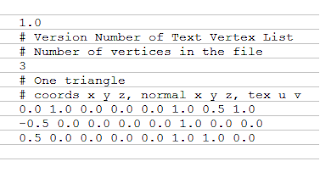
The standard for the file will be simple. The file is going to be text based. The file header will contain, first, the file version (starting at 1.0). This is so that if I change the format in the future, I don't have to scrap the files I may already be using. It's also just good form to version file formats. In the next line, the number of vertices contained in the file. In the next line, and for every line afterwards, the x, y and z values of the vertex, separated by white space, followed by the x, y and z values of the normal at each point, followed by the u, v values of the texture coordinates. The format will permit comments in lines that start with '#'. All values are mandatory, and upon finding a malformed line the file will stop being read.
This should help with testing, once everything else is working.
For starters, the program is contained in a Game class. I created a Layer base class, and Layer classes for each layer. The Game class holds one of each layer; Application, Resource and Engine. I also created an Interface base class, from which all the interfaces inherit. Something I'm not happy with is the names I gave them. The Resource Interface in the Application Layer is not the same as the Resource Interface in the Engine layer. This means that for N number of layers, I could have up to N*N-1 kinds of interfaces. This may be excessive, since not all Layers are connected to all others (Engine is only connected to Resource, for example). However, it still requires a multitude of classes. I may eventually figure a solution to this, but for now it should be enough for my purposes.

Design grows more detailed as I try to implement it
I spoke a great deal about 'connecting' the different layers, and communications between them. This, unfortunately, cannot be done from within the class. I can't have an internal 'link to layer' method in the Interface class, since it doesn't know about anything outside itself. Instead, to link two layers together, the containing structure (Game in this case) has to pass each a pointer to the other. I could have a method in the Layer itself that links the contained interface to a pointer given to it, though.
To support this, I've given the Interface base class an Interface pointer called link. I also gave Interface a method, 'LinkTo(Interface*)' that takes a pointer to an interface and links the interface to it. On the Layer base class, I created another method that takes an Interface and a pointer to an interface, and calls the LinkTo method in the Interface with the pointer as a parameter.
Now I need a method to ask each Layer the address of their interfaces, so that other layers can link to them. I want to keep this general, so I don't have to write one method for each Layer, but in order to make it part of the Layer class Layer must know what interfaces the layer will ultimately have, which is something known by the derived classes. The problem is the number of interfaces is variable. Let such a method be called "GetInterface". It would have to return an array of some kind with all the Interfaces the Layer has. Then the calling code would have to determine which interface should connect where.
I could hack some brute force, "this goes here" sort of code, where I manually link each pair of interfaces, but that isn't elegant. Part of the problem goes back to what I didn't like about my interface code before; I'm making too many derived classes. This will require some more thinking.
In the meantime, I'll move over to other issues I have dealt with.
I included a Resource* vector in the Manager base class. If any of the managers ever need a different kind of storage, I'll think of something. Something else I decided on was to create a simple 'vertex list' file format to store simple models in. This is going to help avoid cluttering the code with hard coded models, and the infrastructure required to read one kind of file type can easily be extended to read others.

Sample tvl (Text Vertex List) file
The standard for the file will be simple. The file is going to be text based. The file header will contain, first, the file version (starting at 1.0). This is so that if I change the format in the future, I don't have to scrap the files I may already be using. It's also just good form to version file formats. In the next line, the number of vertices contained in the file. In the next line, and for every line afterwards, the x, y and z values of the vertex, separated by white space, followed by the x, y and z values of the normal at each point, followed by the u, v values of the texture coordinates. The format will permit comments in lines that start with '#'. All values are mandatory, and upon finding a malformed line the file will stop being read.
This should help with testing, once everything else is working.
Program Design, Demo
There's an annoying issue when designing a program; you can't see the result of the desig until you are done. But sometimes, in order to make a design decision, you might want to see what you have working, get a feel for it. It's an iterative process. There's a reason so many programs minimize or ignore the need for design: designing is boring, compared to actually coding and creating something that works.
There's always the temptation to design as you code and fix things later. Then when the code is crisscrossed with hacks made to get it working, you feel like scrapping it and starting over. I'm going to try to fight that urge and do things right. That means doing a few tests as I design, settling on methods and structure, and leaving the actual program for the future. That's where Demos come in.
I have designed a high level overview of the program. A bit of the class hierarchy, penciled in the data structures I plan to use and the like. I'm close to having the parts in place for the Rendering Engine to actually have something to render. What I'm going to do is make a quick mock-up of the program, with a sparse implementation of everything I talked about until now, and try to get it all ready for prime-time.
I'm not going to actually render anything. No OpenGL calls or anything like that. This is meant to make sure that what I have works, and identify any needs I forgot about. It's going to be a console only application. So let's have a quick rundown of how the program should work:

Once we decide on the scope of the demo, we program it. Gotta jump in Code::Blocks for this....
There's always the temptation to design as you code and fix things later. Then when the code is crisscrossed with hacks made to get it working, you feel like scrapping it and starting over. I'm going to try to fight that urge and do things right. That means doing a few tests as I design, settling on methods and structure, and leaving the actual program for the future. That's where Demos come in.
I have designed a high level overview of the program. A bit of the class hierarchy, penciled in the data structures I plan to use and the like. I'm close to having the parts in place for the Rendering Engine to actually have something to render. What I'm going to do is make a quick mock-up of the program, with a sparse implementation of everything I talked about until now, and try to get it all ready for prime-time.
I'm not going to actually render anything. No OpenGL calls or anything like that. This is meant to make sure that what I have works, and identify any needs I forgot about. It's going to be a console only application. So let's have a quick rundown of how the program should work:

This is what we're going to test
Once we decide on the scope of the demo, we program it. Gotta jump in Code::Blocks for this....
Monday, June 20, 2011
Program Design, Application Layer
So I talked about how to store the resources, and how to hand them to the Engine Layer, but there's still the matter of generating them.
Before they can be stored, shaders have to be read from files, sent to the GPU, compiled, and linked. Only then can they be used, and there is no point storing a broken shader. Textures also need to be read and loaded. As well as models. Configuration options can also be read from files.
All these parts of the program doing similar actions indicate a need to separate the file reading from the parsing. How to do it, though, and what to pass along?

Let's start with the shaders. The source for each kind of shader is found in .vp and .fp (and .gp) files. These stand for Vertex, Fragment and Geometry programs. They are regular text files, nothing fancy. The way I'm doing it right now is by calling a function in the GLTools library, which takes the name of the files and loads the shaders. It works, but it violates certain rules I want to enforce, such as the resource layer knowing about resources, not about the file system.
Still, we can scavenge the function (the license on it is very permisive). Interestingly, the function already separates the code that reads the file from the code that loads the function, which is exactly what we want to do.
glShaderSource is the OpenGL API call we want to use to load the shader to the GPU. The way it wants us to send it the shaders is as a pointer to a null terminated string of GLchars, which is essentially an array ending in '\0'. This means that, in this case, we'd want the file reading part of the program to load the file into an array in memory, and send a pointer to the array to the ShaderManager, which would then be in charge of loading it in the GPU and storing the result of the operation.
This works for any text files, but textures are genrally stored as image files. These are genrally binary encoded and compressed. So how to handle them? One alternative is to read the file, and pass the content in the state that it was received to the resource layer, and let the Resource Layer handle compression and the like. Another is to let the Application Layer deal with the matter of filetypes and enconding and just hand the resulting data to the Resource Layer.

I feel more comfortable with this second approach, myself. For one, it is not necessarily true that only the Texture Manager will want to decode image files. Heightmaps, for example, are one way of storing terrain topography. If I ended up using a picture format for terrain and the same format for a texture, I'd have to repeat the decoding process in each manager. This is what I want to avoid.
As a result, I'll keep functions to decode each filetype in the application layer, and will simply pass along pointers to arrays of bytes to the rest of the program when required. These can then be interpreted as appropriate by each part of the program.
Passing along the full file can be problematic however. Specially in binary files, which can contain structures. There would be little point in decoding unless we were to turn the file into something usable. Now, in the case of shadrs, just passing along a null terminated string is fine, that is what we want. But in the case of images, for example, we could pass along a more elaborate structure, including the height and width of the image, color depth, etc. This is the information the Resource Layer wants.
We can repeat the structure we came up with before for handing resources to the Engine Layer in the communication between the Application and Resource Layers. For starters, we would need a base class for the different structures we might need to pass along. We could re-use 'Resource'. Then we'd need types for the different sort of information that is being entered into the system. "Text" for char arrays (there's a multitude of string classes that could be used), "Image" for textures or heightmaps, and the name of whatever appropriate structure is being sent for other, more complex files.
We can think of these as 'un-processed' resources, which are processed by the Resource Layer into the game resources our engines can use.
As before, we don't want each of our managers dealing with the functions in the Application Layer personally. Instead, when a request for a certain resource is sent their way, they should check if the resource is already stored and return it or, if not, forward the request to load it from file, store it, and return it to whoever asked for it. This forwarding should be done through an interface into the Application Layer, the same way the Engine Layer connects to the Resource Layer.

This takes care of the communication aspect, but we still need to determine how to model the application layer, which for now would consist simply of a smattering of functions. Such as loading files and converting them to and from different file types.
Before they can be stored, shaders have to be read from files, sent to the GPU, compiled, and linked. Only then can they be used, and there is no point storing a broken shader. Textures also need to be read and loaded. As well as models. Configuration options can also be read from files.
All these parts of the program doing similar actions indicate a need to separate the file reading from the parsing. How to do it, though, and what to pass along?

Factoring the 'ReadFile' code away
Let's start with the shaders. The source for each kind of shader is found in .vp and .fp (and .gp) files. These stand for Vertex, Fragment and Geometry programs. They are regular text files, nothing fancy. The way I'm doing it right now is by calling a function in the GLTools library, which takes the name of the files and loads the shaders. It works, but it violates certain rules I want to enforce, such as the resource layer knowing about resources, not about the file system.
Still, we can scavenge the function (the license on it is very permisive). Interestingly, the function already separates the code that reads the file from the code that loads the function, which is exactly what we want to do.
glShaderSource is the OpenGL API call we want to use to load the shader to the GPU. The way it wants us to send it the shaders is as a pointer to a null terminated string of GLchars, which is essentially an array ending in '\0'. This means that, in this case, we'd want the file reading part of the program to load the file into an array in memory, and send a pointer to the array to the ShaderManager, which would then be in charge of loading it in the GPU and storing the result of the operation.
This works for any text files, but textures are genrally stored as image files. These are genrally binary encoded and compressed. So how to handle them? One alternative is to read the file, and pass the content in the state that it was received to the resource layer, and let the Resource Layer handle compression and the like. Another is to let the Application Layer deal with the matter of filetypes and enconding and just hand the resulting data to the Resource Layer.
Decoding in the Resource Layer vs. decoding in the Application Layer
I feel more comfortable with this second approach, myself. For one, it is not necessarily true that only the Texture Manager will want to decode image files. Heightmaps, for example, are one way of storing terrain topography. If I ended up using a picture format for terrain and the same format for a texture, I'd have to repeat the decoding process in each manager. This is what I want to avoid.
As a result, I'll keep functions to decode each filetype in the application layer, and will simply pass along pointers to arrays of bytes to the rest of the program when required. These can then be interpreted as appropriate by each part of the program.
Passing along the full file can be problematic however. Specially in binary files, which can contain structures. There would be little point in decoding unless we were to turn the file into something usable. Now, in the case of shadrs, just passing along a null terminated string is fine, that is what we want. But in the case of images, for example, we could pass along a more elaborate structure, including the height and width of the image, color depth, etc. This is the information the Resource Layer wants.
We can repeat the structure we came up with before for handing resources to the Engine Layer in the communication between the Application and Resource Layers. For starters, we would need a base class for the different structures we might need to pass along. We could re-use 'Resource'. Then we'd need types for the different sort of information that is being entered into the system. "Text" for char arrays (there's a multitude of string classes that could be used), "Image" for textures or heightmaps, and the name of whatever appropriate structure is being sent for other, more complex files.
We can think of these as 'un-processed' resources, which are processed by the Resource Layer into the game resources our engines can use.
As before, we don't want each of our managers dealing with the functions in the Application Layer personally. Instead, when a request for a certain resource is sent their way, they should check if the resource is already stored and return it or, if not, forward the request to load it from file, store it, and return it to whoever asked for it. This forwarding should be done through an interface into the Application Layer, the same way the Engine Layer connects to the Resource Layer.

Interfaces connecting the different layers
This takes care of the communication aspect, but we still need to determine how to model the application layer, which for now would consist simply of a smattering of functions. Such as loading files and converting them to and from different file types.
Subscribe to:
Posts (Atom)